How Do I use Pytorch with RTX 5060 Ti

Hello I’m new here. Can someone help me with this? I can’t find a compatible pytorch for my RTX 5060 Ti. Here’s my system and it’s issues. I’ve tried the nightly version and it still won’t work.

"Python 3.10.11

Checking PyTorch…
PyTorch Version: 2.8.0.dev20250618+cu128

Checking GPU and Driver…
Thu Jun 19 16:38:25 2025
±----------------------------------------------------------------------------------------+
| NVIDIA-SMI 576.80 Driver Version: 576.80 CUDA Version: 12.9

Checking CUDA Toolkit…
nvcc: NVIDIA (R) Cuda compiler driver
Copyright (c) 2005-2024 NVIDIA Corporation
Built on Fri_Jun_14_16:44:19_Pacific_Daylight_Time_2024
Cuda compilation tools, release 12.6, V12.6.20
Build cuda_12.6.r12.6/compiler.34431801_0

Checking PyTorch CUDA and GPU Compatibility…
CUDA Available: Yes
PyTorch CUDA Version: 12.8
GPU Compute Capability: (12, 0)
GPU Compatibility: Not supported by PyTorch 2.8.0.dev20250618+cu128. Try a nightly build: https://pytorch.org/get-started/locally/"

1 Like

You’ve installed the right binary. Could you explain where this error message comes from as I haven’t seen it before?

I get the error when I install the pytorch nightly build or the stable version. I’m trying to run FramePack with GPU acceleration, and I get this error no matter what pytorch version I use. I have a batch file that checks for compatibility between PyTorch CUDA and GPU. When I run it I get the error. Every time.

I would recommend trying to install the latest stable or nightly PyTorch binary with CUDA 12.8 standalone without any 3rd party libs which seem to raise the error message.
Refer to e.g. this post for a smoke test.

Thank you. I will try that and let you know the results.

I switched to:
nvcc: NVIDIA (R) Cuda compiler driver
Copyright (c) 2005-2025 NVIDIA Corporation
Built on Fri_Feb_21_20:42:46_Pacific_Standard_Time_2025
Cuda compilation tools, release 12.8, V12.8.93
Build cuda_12.8.r12.8/compiler.35583870_0

Checking PyTorch CUDA and GPU Compatibility…
CUDA Available: Yes
PyTorch CUDA Version: 12.8
GPU Compute Capability: (12, 0)
GPU Compatibility: Not supported by PyTorch 2.8.0.dev20250618+cu128. Try a nightly build: https://pytorch.org/get-started/locally/

and I get the same error

Your locally installed CUDA toolkit won’t be used as the binaries ship with their own CUDA runtime dependencies. I would still recommend executing the smoke test I’ve linked before since you are still using 3rd party libs raising unknown error messages.

For RTX 50XX series, I just install CUDA 12.8 and then

pip install --pre torch torchvision --index-url https://download.pytorch.org/whl/nightly/cu128
2 Likes

yaa, its work, there is no issue

This works for me
MSI RTX 5090 TI

  1. Install with CUDA:

bash

CopyEdit

pip install torch torchvision torchaudio --index-url https://download.pytorch.org/whl/cu121  
  1. Verify GPU:

python

CopyEdit

import torch  
print(torch.cuda.is_available())  
print(torch.cuda.get_device_name(0))  

This won’t work since you are explicitly installing an old PyTorch binary with CUDA 12.1 while CUDA 12.8+ is required.

May I ask if you have solved this problem? I am experiencing the same issue as you and still haven’t resolved it. I need help.

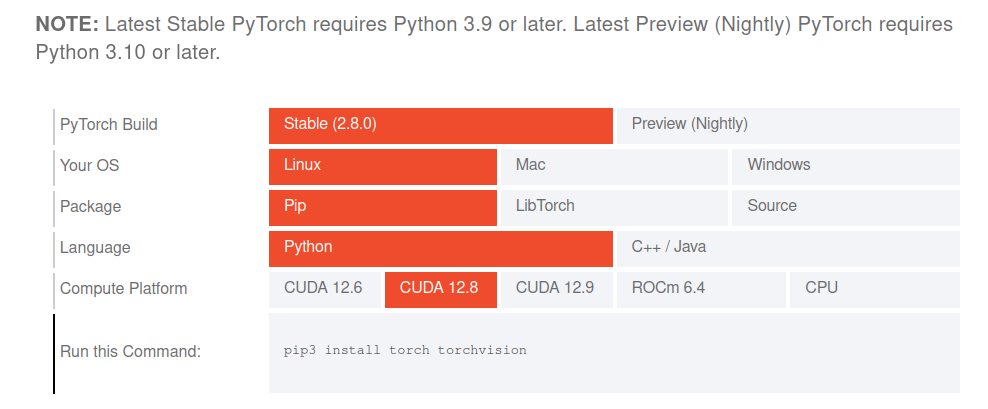
Install any of our PyTorch binaries built with CUDA 12.8+ using the install command from our install matrix. E.g. a simple pip install torch will install torch==2.8.0+cu128 on Linux x86 systems supporting Blackwell GPUs:

EDIT: From your cross-post:

My Python version is 3.8.10 and CUDA is 12.8. Using the official pip and Nightly commands to download PyTorch 12.8 shows that this version cannot be found

This is expected as Python >= 3.9 is needed as described on the install page:

NOTE: Latest Stable PyTorch requires Python 3.9 or later. Latest Preview (Nightly) PyTorch requires Python 3.10 or later.

so update your Python version and rerun the install command. @mia2

This is what worked for me, …

RTX 5060 Ti 16GB Setup

Hardware Requirements

  • GPU: NVIDIA GeForce RTX 5060 Ti 16GB
  • Architecture: Blackwell (SM 12.0)
  • Driver: NVIDIA 580.82.10+
  • OS: Windows 11 with WSL2

Docker Container Stack

  • Base Image: pytorch-tensorflow-gpu:latest
  • Ubuntu: 24.04 LTS
  • Python: 3.11.14
  • CUDA: 12.8.1
  • cuDNN: 9.x

PyTorch Stack

  • PyTorch: 2.10.0.dev20251017+cu128 (nightly)
  • CUDA Support: Yes (for 1 GPUs)
  • Compute Capability: 12.0 (Blackwell)

TensorFlow Stack

  • TensorFlow: 2.21.0-dev20251017
  • CUDA Runtime: 12.8
  • JIT Compilation: Enabled for Blackwell

AI/ML Libraries

  • diffusers: 0.35.2
  • transformers: 4.57.1
  • accelerate: Latest
  • huggingface-hub: 0.35.3
  • safetensors: 0.6.2

Installation Order

  1. Docker Desktop 4.28+ (WSL2 backend)
  2. NVIDIA Container Toolkit
  3. Clone: GitHub - dconsorte/pytorch-tensorflow-gpu: RTX 5090 & RTX 5060 Docker container with PyTorch + TensorFlow. First fully-tested Blackwell GPU support for ML/AI. CUDA 12.8, Python 3.11, Ubuntu 24.04. Works with RTX 50-series (5090/5080/5070/5060) and RTX 40-series.
  4. Build: ./build.sh --no-cache
  5. Install: pip install diffusers transformers accelerate

Verification Commands

nvidia-smi
python -c "import torch; print(torch.cuda.is_available())"
python -c "from diffusers import StableDiffusionPipeline; print('Ready')"

Container Commands

# Start container
docker run --gpus all -v ~/ai_training_env:/workspace -it rtx5060ti-ready

# Test GPU
python -c "import torch; print('GPU:', torch.cuda.get_device_name(0))"

Performance Specs

  • GPU Memory: 16,311 MiB total
  • CUDA Cores: Blackwell architecture
  • Memory Bandwidth: Optimized for 16GB VRAM
  • Mixed Precision: FP16 support enabled

GitHub - dconsorte/pytorch-tensorflow-gpu: RTX 5090 & RTX 5060 Docker container with PyTorch + TensorFlow. First fully-tested Blackwell GPU support for ML/AI. CUDA 12.8, Python 3.11, Ubuntu 24.04. Works with RTX 50-series (5090/5080/5070/5060) and RTX 40-series.

  • Docker Image: rtx5060ti-ready (41.8GB)

Thanks. It really solves my problem!

pu
/pytorch-tensorflow-gpu$ python main.py
python: can’t open file ‘/home/user/مشروع_تحويل_المحادثة/pytorch-tensorflow-gpu/pytorch-tensorflow-gpu/main.py’: [Errno 2] No such file or directory
(venv310) (base) user@user-MS-7E28:~/مشروع_تحويل_المحادثة/pytorch-tensorflo
w-gpu/pytorch-tensorflow-gpu$
The main.py script does not exist and the error is unrelated to PyTorch. Make sure you are executing valid scripts.