Hi everyone,
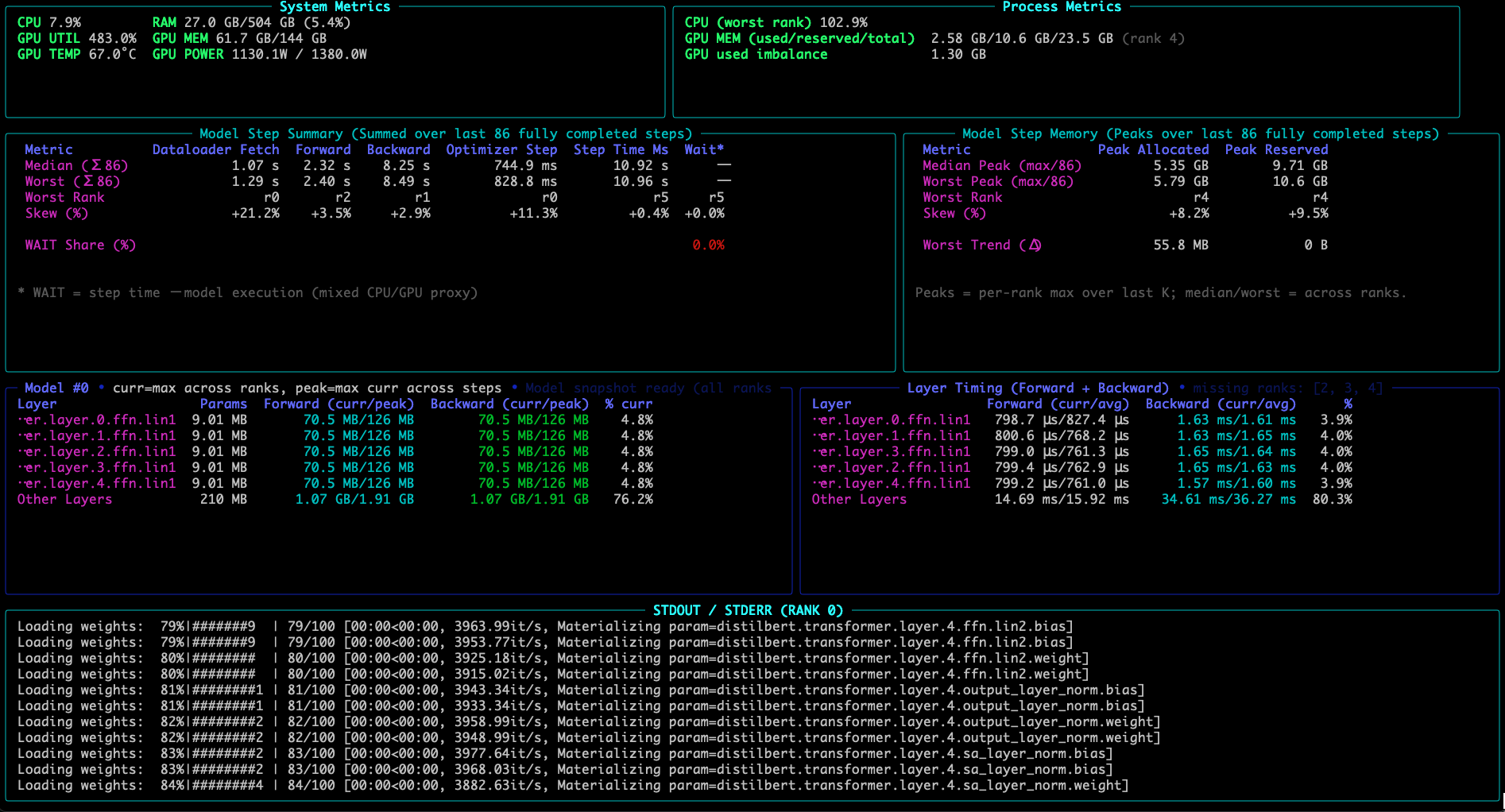
I am building TraceML, an open-source tool for always-on step-level training visibility in PyTorch.
It shows where time and memory go inside each training step while training is still running, making it easier to spot bottlenecks, straggler behavior, and drift without jumping straight into a full profiling workflow.
Current support: Single GPU and Single-node multi-GPU (DDP)
TraceML surfaces:
-
dataloader fetch time
-
forward / backward / optimizer timing
-
step time
-
GPU memory (allocated + peak)
-
median vs worst rank in DDP (single node multiple GPU)
-
skew to highlight imbalance
-
compact end-of-run summary
Basic usage:
from traceml.decorators import trace_step

for batch in dataloader:
    with trace_step(model):
        outputs = model(batch["x"])
        loss = criterion(outputs, batch["y"])
        loss.backward()
        optimizer.step()
        optimizer.zero_grad(set_to_none=True)
Run with:
traceml run train.py
It opens a terminal dashboard alongside the training logs, and prints a summary card at the end.
TraceML is NOT meant to replace PyTorch Profiler or Nsight. It is focused on lightweight, practical visibility during real training runs and crisp end-of-summary.
Repo: GitHub - traceopt-ai/traceml: Lightweight training runtime health monitor · GitHub
PyPI: traceml-ai · PyPI
I would really appreciate feedback from the community, especially on: whether the surfaced signals are the right ones, missing workflow support and where this is useful vs not useful
Update: TraceML now returns a diagnosis, not only measurements
When I first posted TraceML in March, it mainly exposed step timing, memory, and rank-level measurements. The recent release (version 0.4.1) turns those measurements into a short end-of-run diagnosis:
- Verdict: what appears to be the issue
- Why: the measurement supporting that verdict
- Next: where to investigate first
For example, in a T4 experiment:
Current loader
Verdict: INPUT-BOUND
Input Wait: 88.5 ms

Adjusted loader
Verdict: COMPUTE-BOUND
Input Wait: 1.7 ms
This uses the classic ResNet-50 DataLoader case, where input-pipeline tuning is required. The result is the transition: once Input Wait fell, the diagnosis changed from INPUT-BOUND to COMPUTE-BOUND. That shows when to stop tuning the loader and move the investigation to model compute.
The current manual PyTorch API is:
import traceml_ai as traceml

traceml.init(mode="auto")

with traceml.trace_step(model):
    loss = model(batch)
    loss.backward()
    optimizer.step()
We extended this workflow for Hugging Face Trainer. An example experiment and runnable notebook can be found here:
TraceML is intended as a first-pass always-on diagnostic layer before deeper profiling: identify when and whether to investigate input, transfer, compute, residual work, or a slow rank, and then use torch.profiler or Nsight where deeper evidence is needed.
If you have a PyTorch or Trainer workload that changed after upgrading torch, transformers, or accelerate, I am looking for few before/after runs. I would like to check whether the summaries point to the same part of the workload that you would investigate.