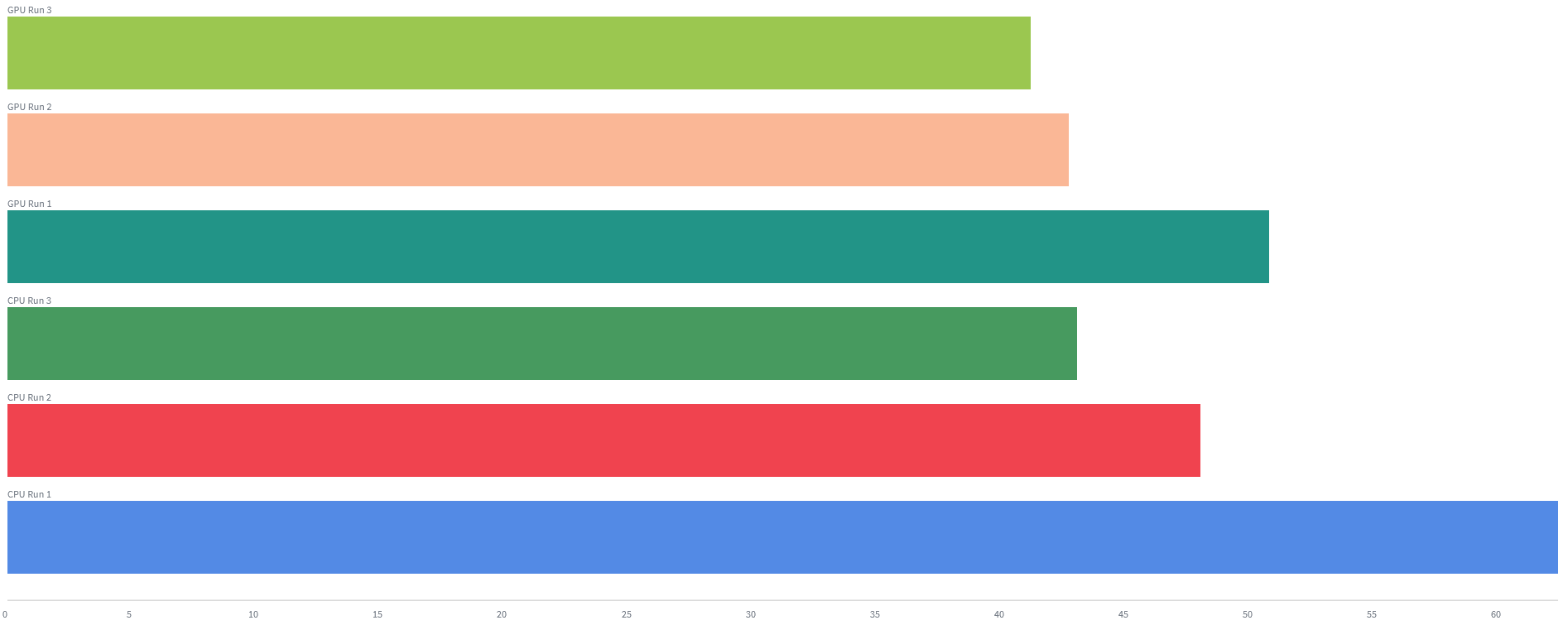
I am running multiple training-inference of a Forward Forward network on a Jetson Orin Nano 8GB, and the first run takes longer. Both on the CPU and the GPU. Below is an example where the top 3 runs are on the GPU and the bottom three runs are on the CPU.
This happens for multiple network configurations. I see that I am not alone: other people have also observed this. See here, here and here.
To ensure repeatability in my measurements, I want to reset PyTorch (and associated objects in memory).
Would calling torch.cuda.empty_cache() (mentioned here and here) and dynamo.reset() (mentioned here) be enough to empty any existing objects in the memory?
No, you would also need to delete all references to objects holding allocations before clearing the cache.
Yes, warmup iterations, including CUDA init times and runtime compiler overheads, should be ignored when you want to profile the actual iteration speed.
Merry Christmas @ptrblck and thanks for your helpful messages (long time lurker here ).
Based on your comments, and the script you mention here, I made this minimal example on Colab.
import torch
import pandas as pd
memory_data = []

for i in range(5):
  iteration_data = {'Iteration': i + 1}
  iteration_data['on start'] = torch.cuda.memory_allocated()

  input_features = 32
  output_features = (i+1) * 1024
  x = torch.randn(32, input_features, device='cuda')
  model = torch.nn.Linear(input_features, output_features, device='cuda')
  model(x)
  iteration_data['before deleting'] = torch.cuda.memory_allocated()

  del x, model
  iteration_data['after deleting'] = torch.cuda.memory_allocated()

  torch.cuda.empty_cache()
  iteration_data['after empty cache'] = torch.cuda.memory_allocated()

  torch._C._cuda_clearCublasWorkspaces()
  iteration_data['after clearing the cuBLAS workspace'] = torch.cuda.memory_allocated()

  memory_data.append(iteration_data)

df = pd.DataFrame(memory_data)
display(df)
Iteration
on start
before deleting
after deleting
after empty cache
after clearing the cuBLAS workspace
1
0
9707520
9568256
9568256
0
2
0
9842688
9568256
9568256
0
3
0
9977856
9568256
9568256
0
4
0
10113024
9568256
9568256
0
5
0
10248192
9568256
9568256
0
You can see that:
(a) the model size increases in each loop as is expected,
(b) deleting the model and x objects reduces the memory allocated to 9568256 bytes, regardless of the model size, and
(c) clearing cuBLAS is a required step to eliminate the allocated memory
How should I have known that calling torch._C._cuda_clearCublasWorkspaces() is required? Is there a set of similar function calls I can include in my code to 100% make sure that there are no PyTorch objects in the memory?
I don’t know if other libraries hold a workspace but would not exclude the possibility. If you have a strong use case to clear all memory including workspaces, could you please create a feature request so we could make sure workspace allocations are properly documented or could discuss an API to clear these?
 ).
).